Automating content assignment to the sales reps

Automating content assignment to the sales reps

The design process of creating Automation suite for Mindtickle

Type

0 to 1, Web app, Strategic

Timeline

2021 (MVP), 2022 (Phase 2),

2023 (Phase 3)

My role

Responsible for the end-to-end design

Team

1 designer, 1 ux writer, 1 product manager, 8+ Devs
About Mindtickle

Mindtickle is a B2B SaaS sales enablement platform that provides businesses with solutions to coach their sales teams. The platform mainly has two user roles: Admins, who are the sales managers, and Learners, who are the sales representatives. Admins are responsible for assigning relevant learning material to the sales reps, tracking their progress, and coaching them to improve their performance.

Business problem

Customers were finding it difficult and time-consuming to create content assignment rules. This involved creating rules logic in Excel, and then sharing it with their success managers for development in the back-end by the support team. The lack of transparency and control caused frustrations and led to slower and inaccurate content assignments.

🤖 Designing an automated way to assign learning content

Problem Statement

Admin users of Mindtickle need to organize learners according to their profiles and assign them content based on performance without the intervention of the support team.

Secondary research

Understanding the pain points of the customers and support team

In order to begin the research, I reviewed the rules that were already established by the support team. I also had discussions with the support team and customer success managers to gain an understanding of the types of requests that users typically bring to them.

User research and market benchamarking
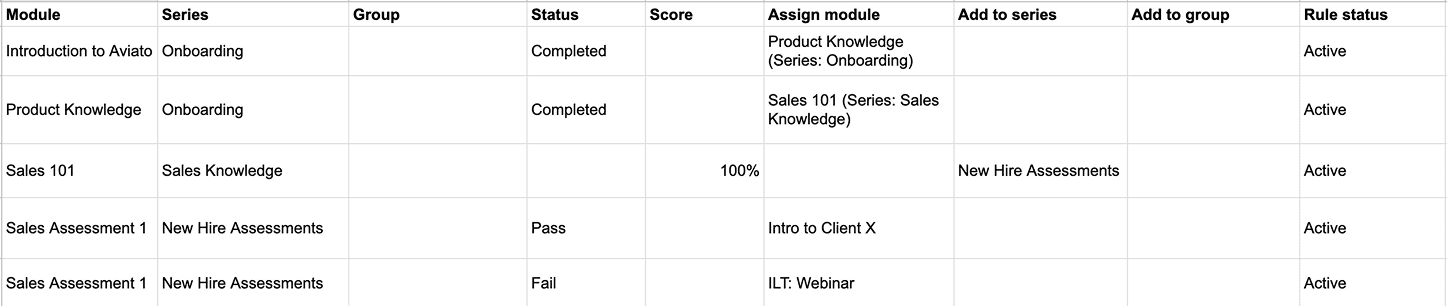
  1. Skimming through the excel sheets containing hundreds of rules created in the back-end by the support team for 20+ customers.

  2. All the rules were analysed to understand:

    • Use cases for the existing rules

    • Complexity and patterns in conditions and actions

    • Future needs and scenarios

  3. We conducted market research on our competitors' solutions and other automation platforms, such as Zapier and IFTTT, which helped us realise the significance of user-friendly, multi-step rule creation.

  1. Skimming through the excel sheets containing hundreds of rules created in the back-end by the support team for 20+ customers.

  2. All the rules were analysed to understand:

    • Use cases for the existing rules

    • Complexity and patterns in conditions and actions

    • Future needs and scenarios

  3. We conducted market research on our competitors' solutions and other automation platforms, such as Zapier and IFTTT, which helped us realise the significance of user-friendly, multi-step rule creation.

  1. Skimming through the excel sheets containing hundreds of rules created in the back-end by the support team for 20+ customers.

  2. All the rules were analysed to understand:

    • Use cases for the existing rules

    • Complexity and patterns in conditions and actions

    • Future needs and scenarios

  3. We conducted market research on our competitors' solutions and other automation platforms, such as Zapier and IFTTT, which helped us realise the significance of user-friendly, multi-step rule creation.

Getting hang of the mindtickle platform
  1. Hierarchy and building blocks of the platform.

  2. Automation use cases for every domain, and their complexity.

  3. Business need for every use case.

Insights

Actionable to-dos

The research synthesis gave us some actionable insights to keep in mind while ideating the solution.

Users create simple rules

Majority of the rules were 1:1, “If this happens then do that."

Users do not edit the rules often

An admin does not manages rules frequently.

Users rely on context for rule creation

Admins who are managing content, tend to define rules more often.

Design goals

What do we want to create?

Before moving to ideation, we set design goals to envision the automation platform we wanted to create.

Scalable

Design layout should facilitate easy onboarding of future rules.

Simple

Easy to understand creation flow. Approachable, non-intimidating experience.

Smart

System that can handle complexities in rules. Able to understand the user needs.

Ideation

Design explorations

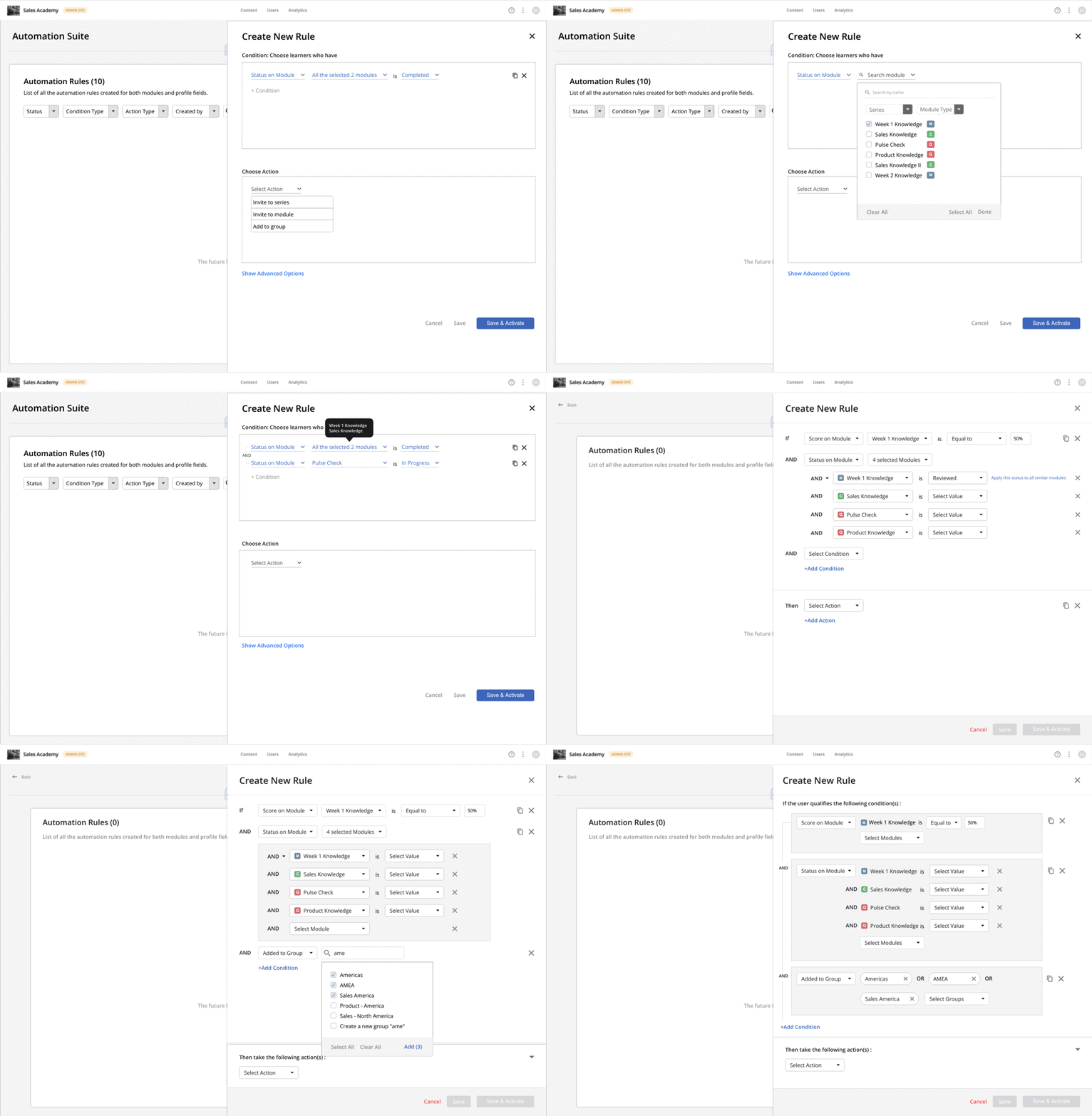
As part of our design process, we created task flows for each user scenario and brainstormed various design options. We noticed that traditional automation platforms were too technical and intimidating, so we aimed to provide our users with a simple experience of creating and managing rules, with minimal clicks required.
  • Solution

    Comprehensive landing page

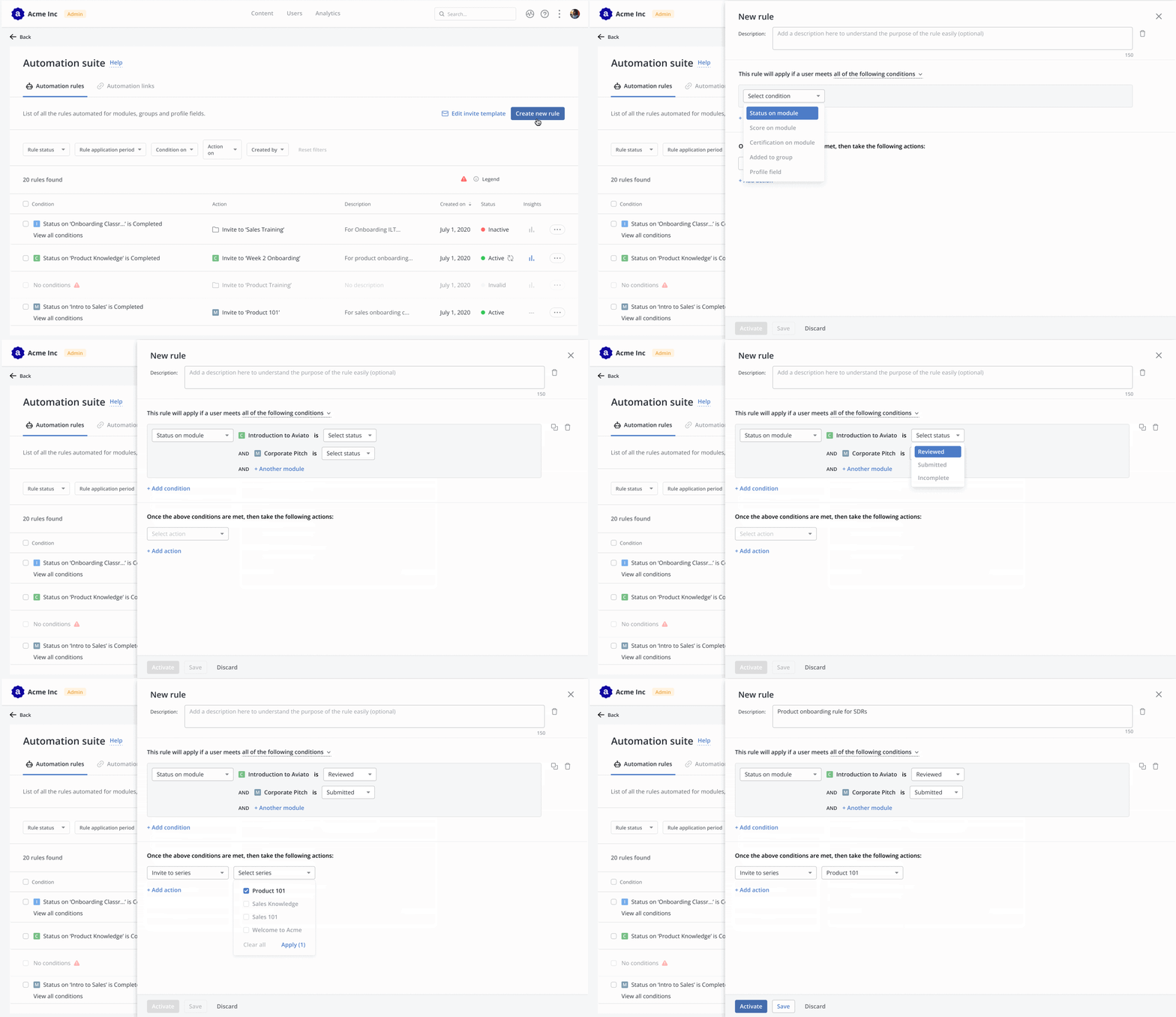
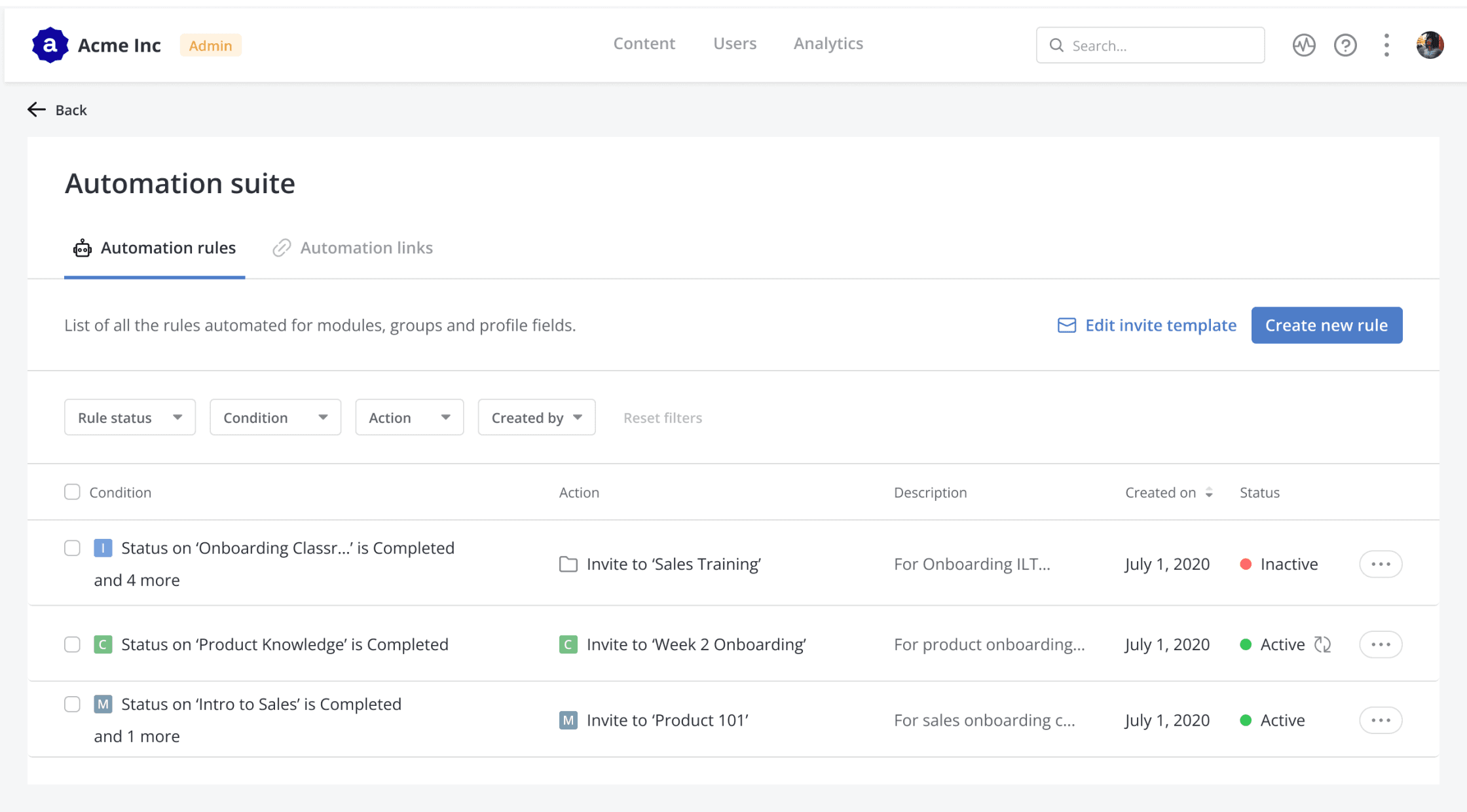
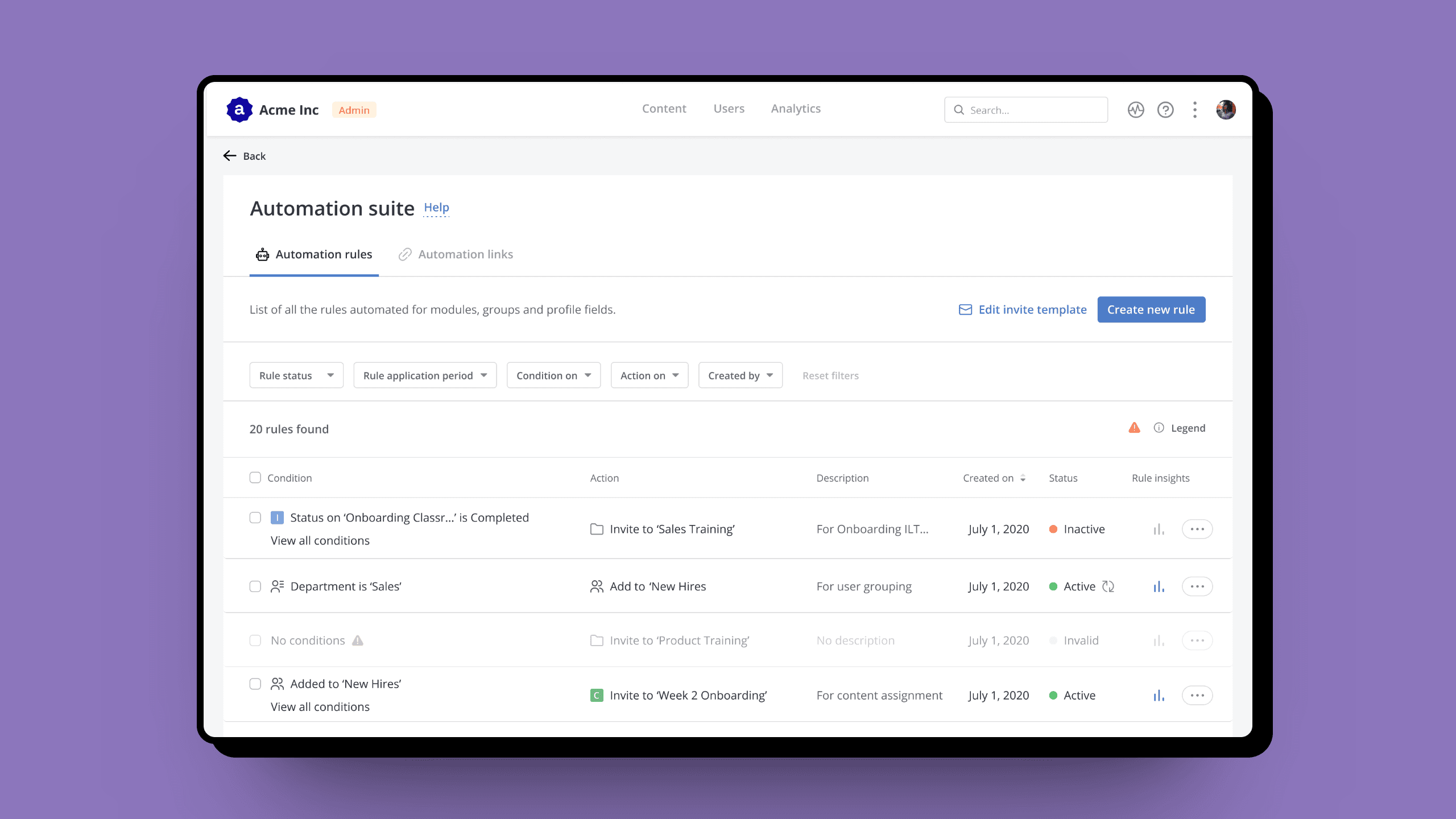
    The MVP version landing page was comprehensive with rule details, quick actions, and filters. Admins can simply change status without opening the rule every time.

  • solution

    Easy rule creation

    We decided to have creation flow in panel instead of full page modals, since panels provide more context and keep it easy to switch between different rules. Rule details varies contextually based on type of condition. For MVP only ‘and’ logic was provided.

  • solution

    Manage at a glance

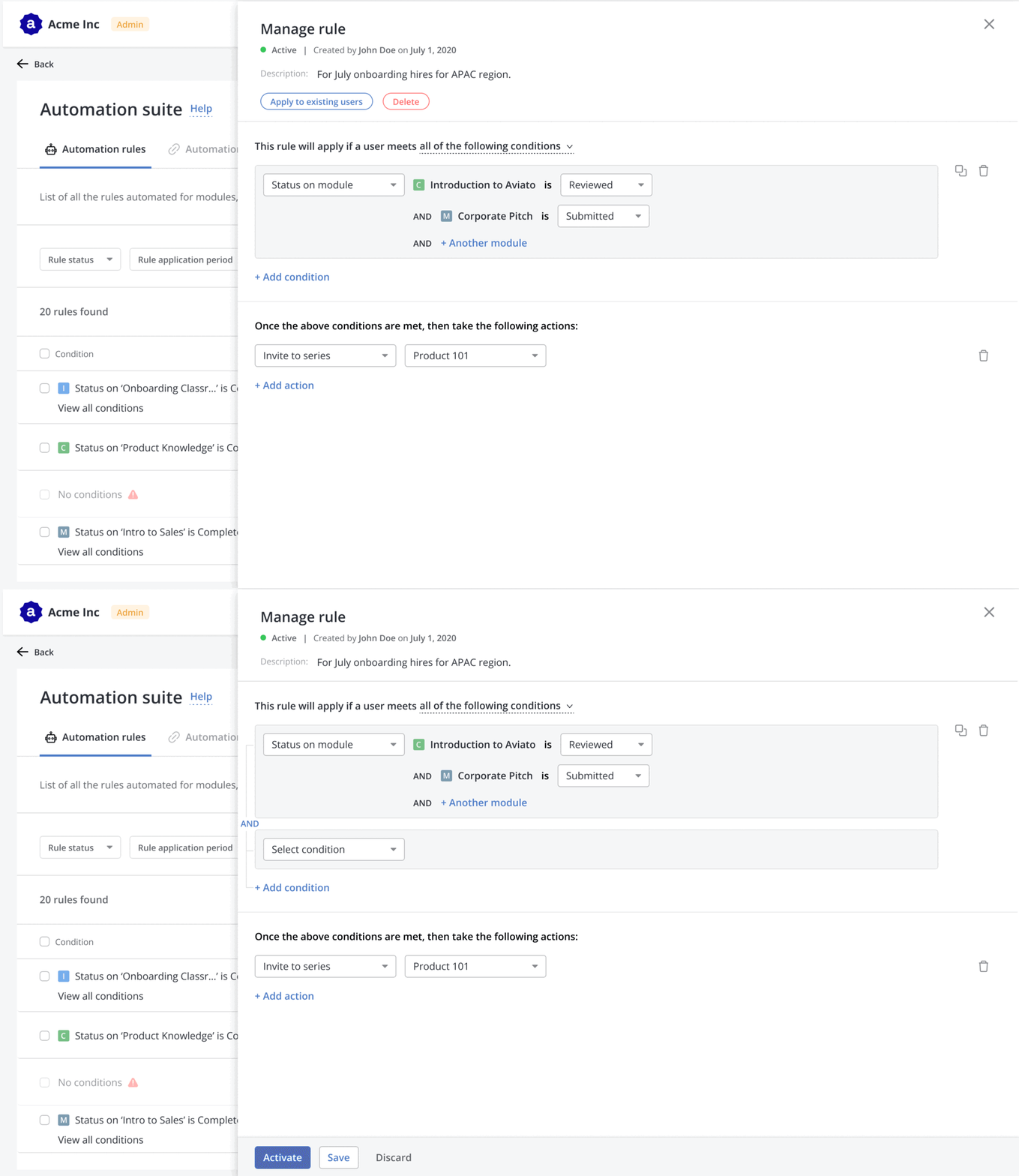
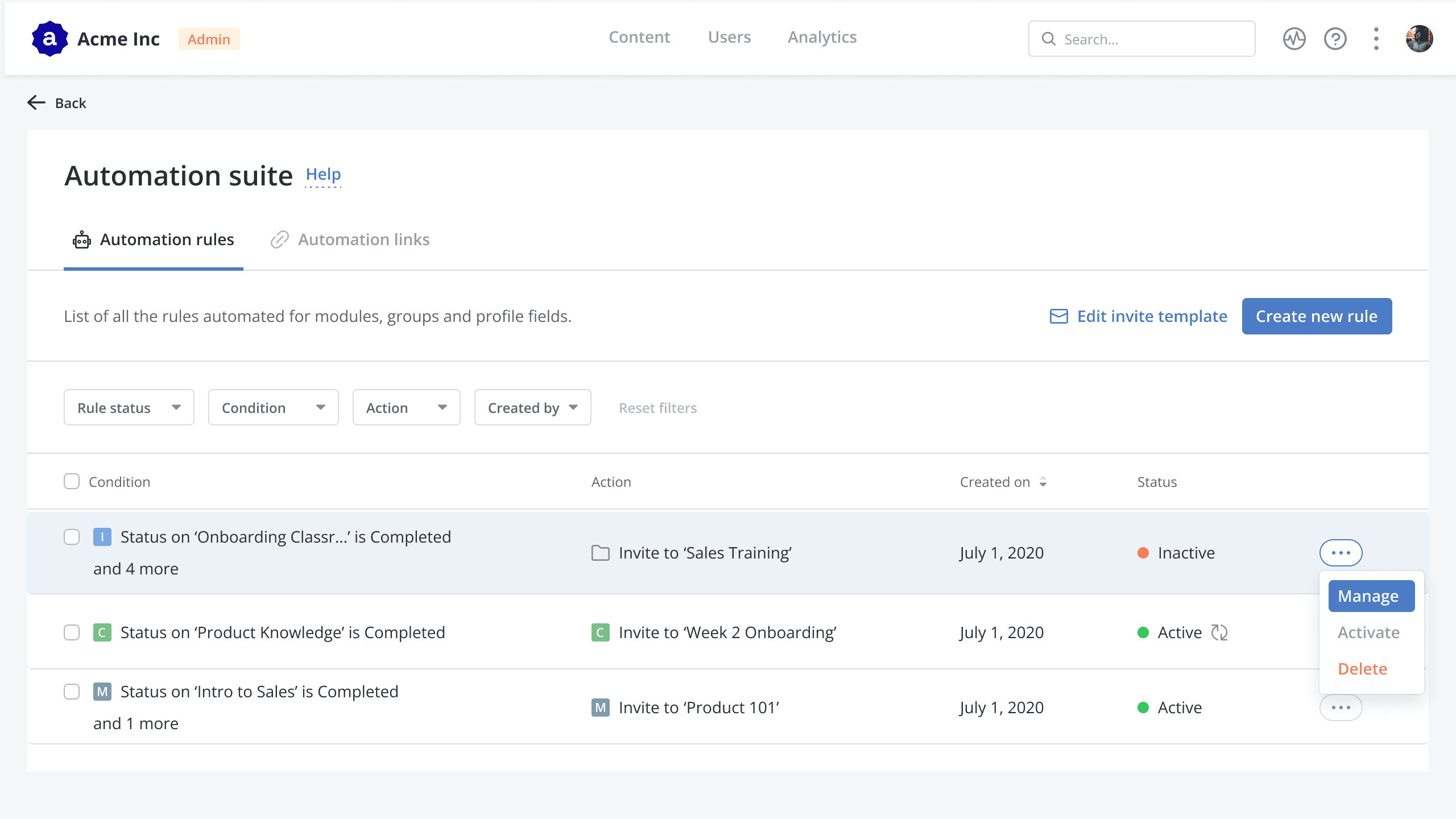
    Managing a rule is similar to creating a rule to maintain familiarity with the flow. Status change CTAs are kept upfront for quick actions, and edit happens on click of any rule detail.

  • Solution

    Comprehensive landing page

    The MVP version landing page was comprehensive with rule details, quick actions, and filters. Admins can simply change status without opening the rule every time.

  • solution

    Easy rule creation

    We decided to have creation flow in panel instead of full page modals, since panels provide more context and keep it easy to switch between different rules. Rule details varies contextually based on type of condition. For MVP only ‘and’ logic was provided.

  • solution

    Manage at a glance

    Managing a rule is similar to creating a rule to maintain familiarity with the flow. Status change CTAs are kept upfront for quick actions, and edit happens on click of any rule detail.

  • Solution

    Comprehensive landing page

    The MVP version landing page was comprehensive with rule details, quick actions, and filters. Admins can simply change status without opening the rule every time.

  • solution

    Easy rule creation

    We decided to have creation flow in panel instead of full page modals, since panels provide more context and keep it easy to switch between different rules. Rule details varies contextually based on type of condition. For MVP only ‘and’ logic was provided.

  • solution

    Manage at a glance

    Managing a rule is similar to creating a rule to maintain familiarity with the flow. Status change CTAs are kept upfront for quick actions, and edit happens on click of any rule detail.

Shipping

Releasing the MVP to customer’s delight

We tested the designs internally with stakeholders and released them in January 2021. Within the first few days, more than 20 of our customers had already adapted to the changes, while the rest gradually moved towards automating their processes over time. The increased adoption of the new designs prompted us to enhance their capabilities and onboard more use cases. If you're interested in learning more about the evolution process, keep reading.

🔍 Making it easier to search and manage rules

The problem

Admin users of Mindtickle want to search for a specific rule and understand its purpose.
  • Improvement 1

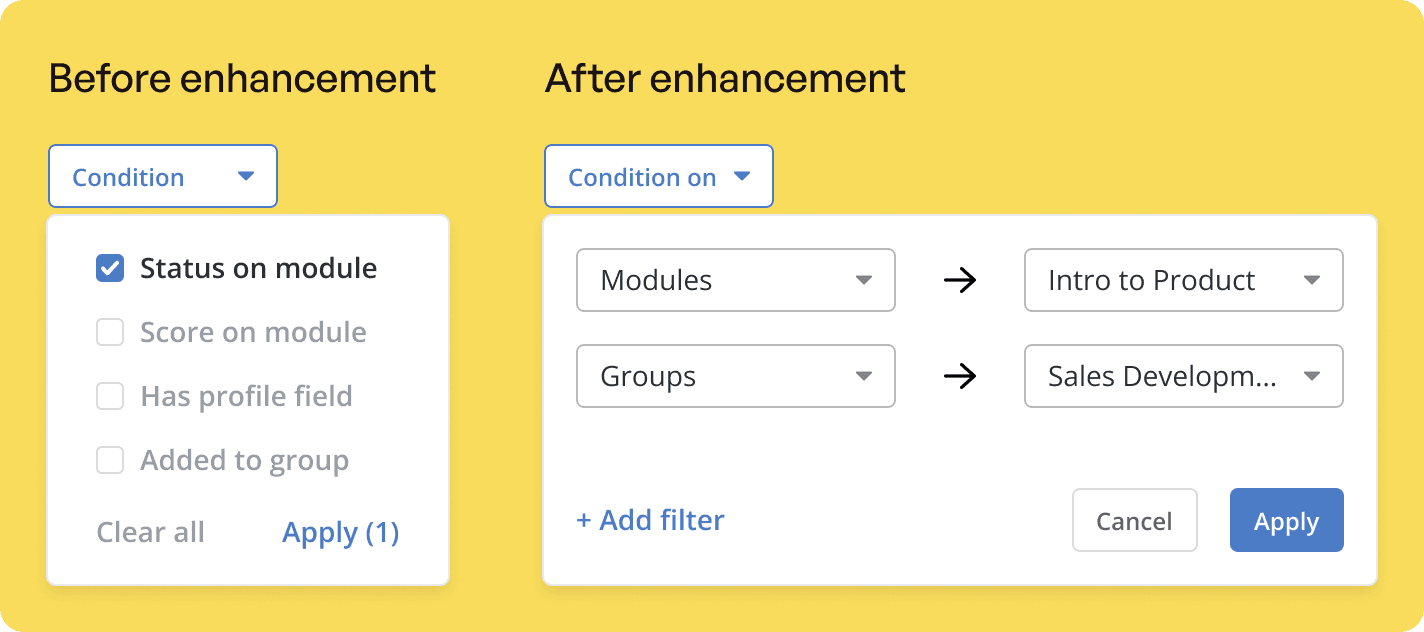
    Better filtering to find the exact rule from a large list

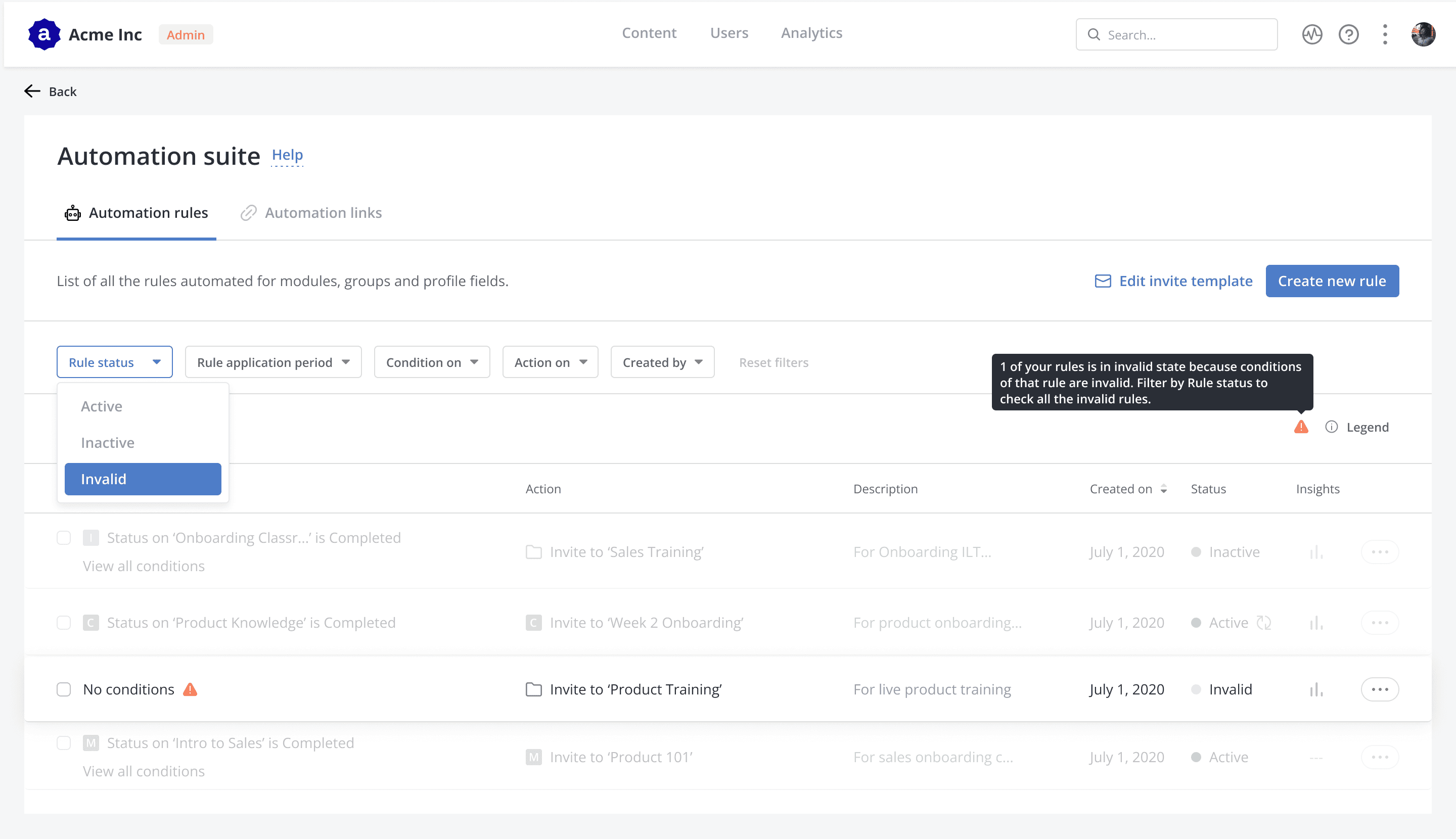
    MVP version lacked contextual filters, resulting in broad results and manual rule searching by users. I redesigned the filters to be contextual based on the rules' conditions and actions, resulting in faster and more accurate filtering.

  • improvement 2

    Spotting a specific rule with the help of descriptions

    The MVP version's landing page had limited rule information. Admins often got confused about similar rules and their purposes. We added a description column to allow the admin to quickly select the appropriate rule without opening the panel every time.

📊 Providing insights into the rules performance

The problem

Admin users of Mindtickle want to track rule effectiveness and identify stagnant ones.
  • Improvement 1

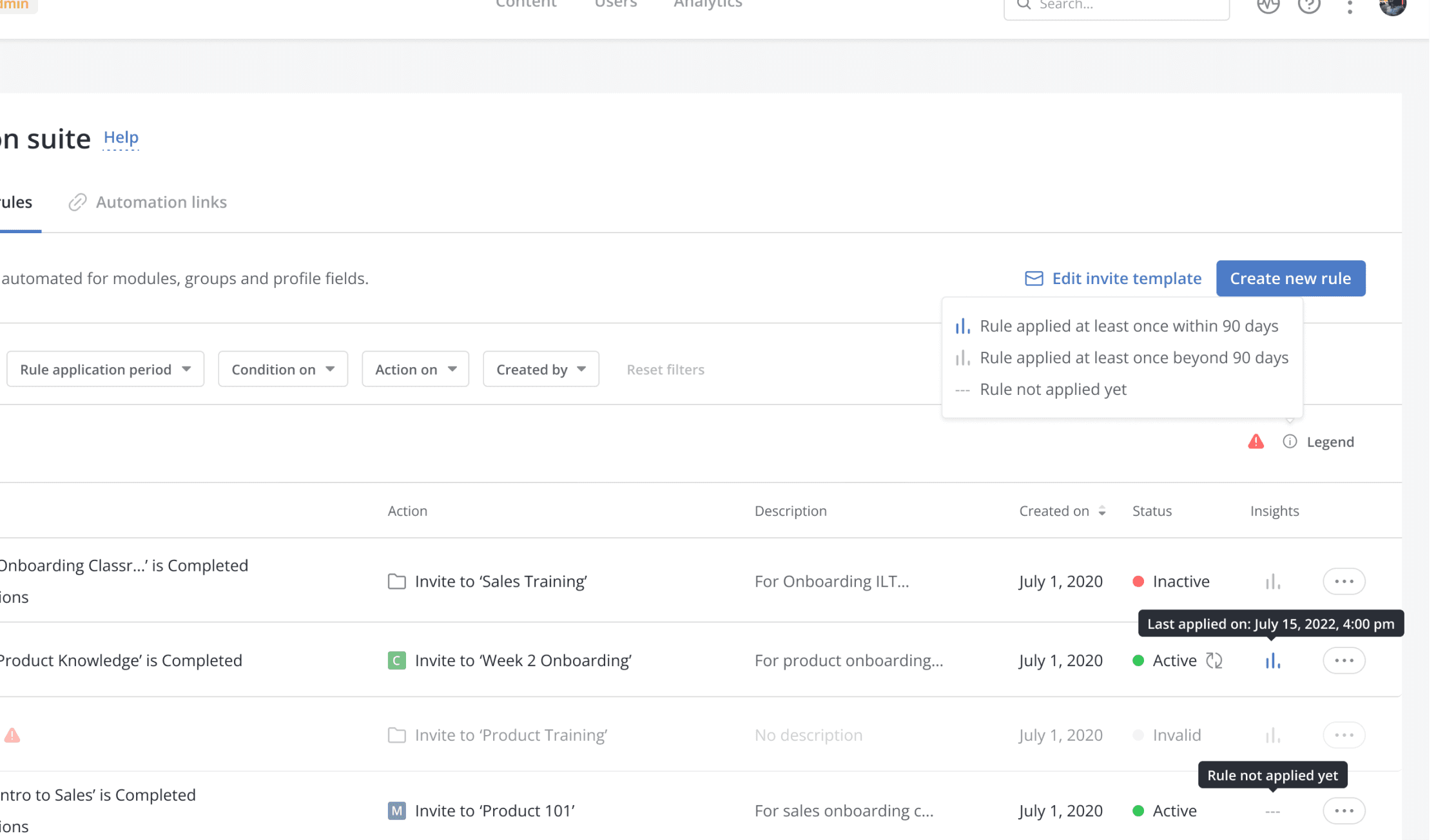
    When did a rule last work?

    Admins were not checking if rules needed modification or removal, causing unwanted stagnant rules and storage usage. We introduced rule insights to display the last time actions were assigned to learners. Insights icon is grey if more than 90 days, and blue if between 60-90 days.

  • Improvement 2

    Highlighting the rules no longer needed

    If a part of the condition is deleted from the platform, the rule would become invalid as it is no longer original. We added an Invalid status for rules that need action from admins.

Results

How did Automation impact the Mindtickle business

Insights as of Jan, 2024

No. of customers using

94

As of Jan 5, 2024.

No. of rules created

1520

In 6 months (July 2023-Jan 2024). Out of which 340 are complex rules, with more than 5 conditions.

Conversion rate

27%

As of Jan 5, 2024. Improved from being 19% in the year 2022-23.

Learnings

Beginning of my journey as a product designer

  • Designing this automation suite helped me understand and design for complex problems and systems.

  • I realised that a feature takes time to develop and grow, and that an MVP (Minimum Viable Product) may not be sufficient to solve every problem.

  • Working with developers became easier when I took the time to understand their challenges and define the end goals.

  • Scaling a design is a delicate process, and it's important to consider this from the beginning of the design process to avoid problems later on.